


Recent post
Static Default Route
Topologi
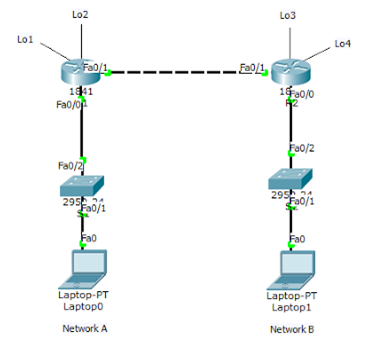
Tabel
Addressing
|
Device
|
Interface
|
IP Address
|
Subnet
Mask
|
Default
Gateway
|
|
R1
|
Fa0/0
|
192.168.1.254
|
255.255.255.0
|
N/A
|
|
Fa1/0
|
12.12.12.1
|
255.255.255.0
|
N/A
|
|
|
Lo1
|
172.16.1.1
|
255.255.255.0
|
N/A
|
|
|
Lo2
|
172.16.2.2
|
255.255.255.0
|
N/A
|
|
|
R2
|
Fa0/0
|
192.168.2.254
|
255.255.255.0
|
N/A
|
|
Fa1/0
|
12.12.12.2
|
255.255.255.0
|
N/A
|
|
|
Lo3
|
172.16.3.3
|
255.255.255.0
|
N/A
|
|
|
Lo4
|
172.16.4.4
|
255.255.255.0
|
N/A
|
|
|
S1
|
N/A
|
VLAN 1
|
N/A
|
N/A
|
|
S2
|
N/A
|
VLAN 1
|
N/A
|
N/A
|
|
Laptop1
|
NIC
|
192.168.1.1
|
255.255.255.0
|
192.168.1.254
|
|
Laptop2
|
NIC
|
192.168.2.1
|
255.255.255.0
|
192.168.2.254
|
Tujuan
- Setting
static default route
Konsep Dasar
Static
default route adalah static route dengan network address destination 0.0.0.0
dan subnet
mask 0.0.0.0. Dikenal juga sebagai “quad zero” route. Static default route melakukan identifikasi
gateway yang akan digunakan oleh router untuk mengirimkan semua paket IP untuk network
destination yang tidak diketahui di routing table, sehingga akan diforward ke route 0.0.0.0/0.
Untuk konfigurasi static default route dapat menggunakan next-hop ip address atau exit-interface.
mask 0.0.0.0. Dikenal juga sebagai “quad zero” route. Static default route melakukan identifikasi
gateway yang akan digunakan oleh router untuk mengirimkan semua paket IP untuk network
destination yang tidak diketahui di routing table, sehingga akan diforward ke route 0.0.0.0/0.
Untuk konfigurasi static default route dapat menggunakan next-hop ip address atau exit-interface.
Router(config)# ip route 0.0.0.0 0.0.0.0 {ip-address or exit-intf}
Static default route :
- Default
route dapat digunakan ketika network destination tidak diketahui (Internet)-
Default route dapat digunakan ketika hanya ada satu jalur
keluar untuk semua network
destination
destination
- Dapat
mengurangi ukuran routing table
- Jika
router tidak menemukan entry network destination di routing table, maka router
akan
memforward paket ke default route
memforward paket ke default route
- Menjadi
route pilihan terakhir di routing table
Konfigurasi
R1
Router>enable
Router#configure
terminal
Enter
configuration commands, one per line. End with CNTL/Z.
Router(config)#int
fa0/0
Router(config)#ip
address 192.168.1.254 255.255.255.0
Router(config)#no
shut
Router(config-if)#
%LINK-5-CHANGED:
Interface FastEthernet0/0, changed state to up
%LINEPROTO-5-UPDOWN:
Line protocol on Interface FastEthernet0/0, changed state to up
Router(config-if)#int
fa0/1
Router(config-if)#ip
address 12.12.12.1 255.255.255.0
Router(config-if)#no
shut
Router(config-if)#
%LINK-5-CHANGED:
Interface FastEthernet0/1, changed state to up
%LINEPROTO-5-UPDOWN:
Line protocol on Interface FastEthernet0/1, changed state to up
Router(config-if)#int
lo1
Router(config-if)#
%LINK-5-CHANGED:
Interface Loopback3, changed state to up
%LINEPROTO-5-UPDOWN:
Line protocol on Interface Loopback3, changed state to up
Router(config-if)#ip
address 172.16.1.1 255.255.255.0
Router(config-if)#int
lo2
Router(config-if)#
%LINK-5-CHANGED:
Interface Loopback4, changed state to up
%LINEPROTO-5-UPDOWN:
Line protocol on Interface Loopback4, changed state to up
Router(config-if)#ip
address 172.16.2.2 255.255.255.0
Router(config-if)#exit
Router(config)#ip
route 0.0.0.0 0.0.0.0 12.12.12.1
Router(config)#exit
Router#
%SYS-5-CONFIG_I:
Configured from console by console
Router#show
ip route
Codes: C -
connected, S - static, I - IGRP, R - RIP, M - mobile, B - BGP
D - EIGRP, EX - EIGRP external, O - OSPF, IA - OSPF inter
area
N1 - OSPF NSSA external type 1, N2 - OSPF NSSA external
type 2
E1 - OSPF external type 1, E2 - OSPF external type 2, E -
EGP
i - IS-IS, L1 - IS-IS level-1, L2 - IS-IS level-2, ia -
IS-IS inter area
* - candidate default, U - per-user static route, o - ODR
P - periodic downloaded static route
Gateway of
last resort is 0.0.0.0 to network 0.0.0.0
12.0.0.0/24 is subnetted, 1 subnets
C
12.12.12.0 is directly connected, FastEthernet0/1
172.16.0.0/24 is subnetted, 2 subnets
C
172.16.3.0 is directly connected, Loopback3
C
172.16.4.0 is directly connected, Loopback4
C
192.168.2.0/24 is directly connected, FastEthernet0/0
S*
0.0.0.0/0 [1/0] via 12.12.12.1
is directly connected, FastEthernet0/1
Konfigurasi
R2
Router>enable
Router#configure
terminal
Enter
configuration commands, one per line. End with CNTL/Z.
Router(config)#int
fa0/0
Router(config)#ip
address 192.168.2.254 255.255.255.0
Router(config)#no
shut
Router(config-if)#
%LINK-5-CHANGED:
Interface FastEthernet0/0, changed state to up
%LINEPROTO-5-UPDOWN:
Line protocol on Interface FastEthernet0/0, changed state to up
Router(config-if)#int
fa0/1
Router(config-if)#ip
address 12.12.12.2 255.255.255.0
Router(config-if)#no
shut
Router(config-if)#
%LINK-5-CHANGED:
Interface FastEthernet0/1, changed state to up
%LINEPROTO-5-UPDOWN:
Line protocol on Interface FastEthernet0/1, changed state to up
Router(config-if)#int
lo3
Router(config-if)#
%LINK-5-CHANGED:
Interface Loopback3, changed state to up
%LINEPROTO-5-UPDOWN:
Line protocol on Interface Loopback3, changed state to up
Router(config-if)#ip
address 172.16.3.3 255.255.255.0
Router(config-if)#int
lo4
Router(config-if)#
%LINK-5-CHANGED:
Interface Loopback4, changed state to up
%LINEPROTO-5-UPDOWN:
Line protocol on Interface Loopback4, changed state to up
Router(config-if)#ip
address 172.16.4.4 255.255.255.0
Router(config-if)#exit
Router(config)#ip
route 0.0.0.0 0.0.0.0 12.12.12.1
Router(config)#exit
Router#
%SYS-5-CONFIG_I:
Configured from console by console
Router#show
ip route
Codes: C -
connected, S - static, I - IGRP, R - RIP, M - mobile, B - BGP
D - EIGRP, EX - EIGRP external, O - OSPF, IA - OSPF inter
area
N1 - OSPF NSSA external type 1, N2 - OSPF NSSA external
type 2
E1 - OSPF external type 1, E2 - OSPF external type 2, E -
EGP
i - IS-IS, L1 - IS-IS level-1, L2 - IS-IS level-2, ia -
IS-IS inter area
* - candidate default, U - per-user static route, o - ODR
P - periodic downloaded static route
Gateway of
last resort is 0.0.0.0 to network 0.0.0.0
12.0.0.0/24 is subnetted, 1 subnets
C
12.12.12.0 is directly connected, FastEthernet0/1
172.16.0.0/24 is subnetted, 2 subnets
C
172.16.3.0 is directly connected, Loopback3
C
172.16.4.0 is directly connected, Loopback4
C
192.168.2.0/24 is directly connected, FastEthernet0/0
S*
0.0.0.0/0 [1/0] via 12.12.12.1
is directly connected,
FastEthernet0/1
Hasil
Konfigurasi :


TELNET
TOPOLOGI :

Device
|
Interface
|
IP
Address
|
PC-0
|
Fa0
|
192.168.10.10/24
|
Router1
|
Fa0/0
|
192.168.10.1/24
|
|
|
Router>enable
Router#conf terminal
Router(config)#int fa0/0
Router(config-if)#ip address 192.168.10.1 255.255.255.0
Router(config-if)#no sh
Router(config)#int fa0/0
Router(config-if)#ip address 192.168.10.1 255.255.255.0
Router(config-if)#no sh
Setting
authentication di line telnet, jika ada PC yan hendak telnet ke router maka
akan diminta password authentication :
Router(config-if)#line vty 0 4
Router(config-line)#password 123
Router(config-line)#login
|
|
Outputnya
akan seperti ini :
|
PC>telnet 192.168.10.1
Trying 192.168.10.1 ...Open User Access Verification Password: Router>en % No password set. Router> |
|
Router(config)#enable password 123
|
|
Jika
sudah maka kita bisa masuk ke privilege mode
|
Router#telnet 192.168.10.1
Trying 192.168.10.1 ...Open User Access Verification Password: Router>en Password: Router#conf t Enter configuration commands, one per line. End with CNTL/Z. Router(config)# |
|
Dari PC 0
|
|
Router(config)#do sh run
|
|
Hasilnya
password dapat dilihat
|
Building configuration...
Current configuration : 539 bytes version 12.4 no service timestamps log datetime msec no service timestamps debug datetime msec no service password-encryption hostname Router enable password 123 |
Agar
password tidak kelihatan maka kita perlu masukan script :
Router(config)#service password-encryption
|
Dan hasilnya seperti ini setelah di ketik do sh run
|
Router(config)#service password-encryption
Router(config)#do sh run Building configuration... Current configuration : 550 bytes version 12.4 no service timestamps log datetime msec no service timestamps debug datetime msec service password-encryption hostname Router enable password 7 08701E1D |
Virtual LAN (VLAN)
Virtual LAN (VLAN) membagi
satu broadcast domain menjadi beberapa broadcast domain, sehingga dalam satu
switch bisa saja terdiri dari beberapa network. Host yang berbeda VLAN tidak
akan tersabung sehingga security jaringan.
VLAN adalah fasilitas yang
dimiliki oleh siwtch managable, contohnya cisco. Pada switch unmanagable,
port-portnya hanya dapat digunakan untuk koneksi ke network yang sama (satu
network) sehingga tidak mendukung fasilitas vlan
1.
2 Segment 1 Switch

Konfigurasi Switch Nya :
Switch>enable
Switch#configure
terminal
Enter configuration
commands, one per line. End with CNTL/Z.
Switch(config)#vlan
10
Switch(config-vlan)#name
A
Switch(config-vlan)#exit
Switch(config)#vlan
20
Switch(config-vlan)#name
B
Switch(config-vlan)#exit
Switch(config)#
Switch(config)#interface
FastEthernet0/1
Switch(config-if)#
Switch(config-if)#exit
Switch(config)#interface
FastEthernet0/1
Switch(config-if)#
Switch(config-if)#
Switch(config-if)#switchport
access vlan 20
Switch(config-if)#
Switch(config-if)#exit
Switch(config)#interface
FastEthernet0/2
Switch(config-if)#
Switch(config-if)#
Switch(config-if)#switchport
access vlan 10
Switch(config-if)#
Switch(config-if)#exit
Switch(config)#interface
FastEthernet0/3
Switch(config-if)#
Switch(config-if)#
Switch(config-if)#switchport
access vlan 10
Switch(config-if)#
Switch(config-if)#exit
Switch(config)#interface
FastEthernet0/4
Switch(config-if)#
Switch(config-if)#
Switch(config-if)#switchport
access vlan 20
Switch(config-if)#
Switch(config-if)#exit
Switch(config)#
Switch(config)#do wr
Building
configuration...
[OK]
Switch(config)#
Hasil Konfigurasi :
Ping dari PC0 ke PC3

Ping dari PC1 ke PC2


